• Categories
    Category
    {{ postCtrl.tags }}
    • {{ category.tag_type }}

      • {{tag.tag_name}}
      • View more
  • Categories
    Category
    {{ postCtrl.tags }}
    • {{ category.tag_type }}

      • {{tag.tag_name}}
      • View more
  • News
  • Tutorials
  • Forums
  • Tags
  • Users
Tutorial News Comments FAQ Related Articles

How To Install Cherrytree On Linuxmint 19

  • 00:35 lsb_release -a
  • 00:49 add-apt-repository ppa:giuspen/ppa
  • 01:23 apt update
  • 01:42 apt install cherrytree
  • 02:12 cherrytree
{{postValue.id}}

How To Install Cherrytree On Linux Mint 19

Process

Check the Linux Mint version by using the following command

root@linuxhelp:~# lsb_release -a
No LSB modules are available.
Distributor ID:	LinuxMint
Description:	Linux Mint 19 Tara
Release:	19
Codename:	tara

Now add the repository by using the following

root@linuxhelp:~# add-apt-repository ppa:giuspen/ppa
You are about to add the following PPA:
 More info: https://launchpad.net/~giuspen/+archive/ubuntu/ppa
Press Enter to continue or Ctrl+C to cancel

Executing: /tmp/apt-key-gpghome.MpN3U1FOtz/gpg.1.sh --keyserver hkp://keyserver.ubuntu.com:80 --recv-keys 5FE1EFE4
gpg: key B8668B055FE1EFE4: public key "Launchpad PPA for giuspen" imported
gpg: Total number processed: 1
gpg:               imported: 1

Run the apt update command to update the repository

root@linuxhelp:~# apt update
Hit:1 http://archive.ubuntu.com/ubuntu bionic InRelease
Get:2 http://archive.canonical.com/ubuntu bionic InRelease [10.2 kB]                            
Get:3 http://ppa.launchpad.net/giuspen/ppa/ubuntu bionic InRelease [15.9 kB]                    
Ign:4 http://packages.linuxmint.com tara InRelease                                              
Get:5 http://security.ubuntu.com/ubuntu bionic-security InRelease [88.7 kB]                     
.
.
Fetched 7,692 kB in 22s (343 kB/s)                                                              
Reading package lists... Done
Building dependency tree       
Reading state information... Done
727 packages can be upgraded. Run 'apt list --upgradable' to see them.
Install the CherryTree by using the following command
root@linuxhelp:~# apt install CherryTree
Reading package lists... Done
Building dependency tree       
Reading state information... Done
The following additional packages will be installed:
  libgtksourceview2.0-0 libgtksourceview2.0-common p7zip-full python-chardet python-enchant
  python-gtksourceview2 python-pkg-resources
Suggested packages:
  p7zip-rar python-gobject python-wxgtk3.0 libgtksourceview2.0-dev python-setuptools
Recommended packages:
  python-appindicator
.
.
Processing triggers for gnome-menus (3.13.3-11ubuntu1) ...
Processing triggers for hicolor-icon-theme (0.17-2) ...
Setting up python-chardet (3.0.4-1) ...
Setting up libgtksourceview2.0-0:amd64 (2.10.5-3) ...
Setting up python-gtksourceview2 (2.10.1-3) ...
Setting up cherrytree (0.38.9-0) ...
Processing triggers for libc-bin (2.27-3ubuntu1) ...

Run the CherryTree application

root@linuxhelp:~# cherrytree
missing /root/.config/cherrytree/config.cfg
already running '' - ''
2 rise existing ''
pending_new_db_node 1
pending_edit_db_node_hier 1
sel node id=1, seq=1
pending_edit_db_node_buff 1
sel node id=1, seq=1

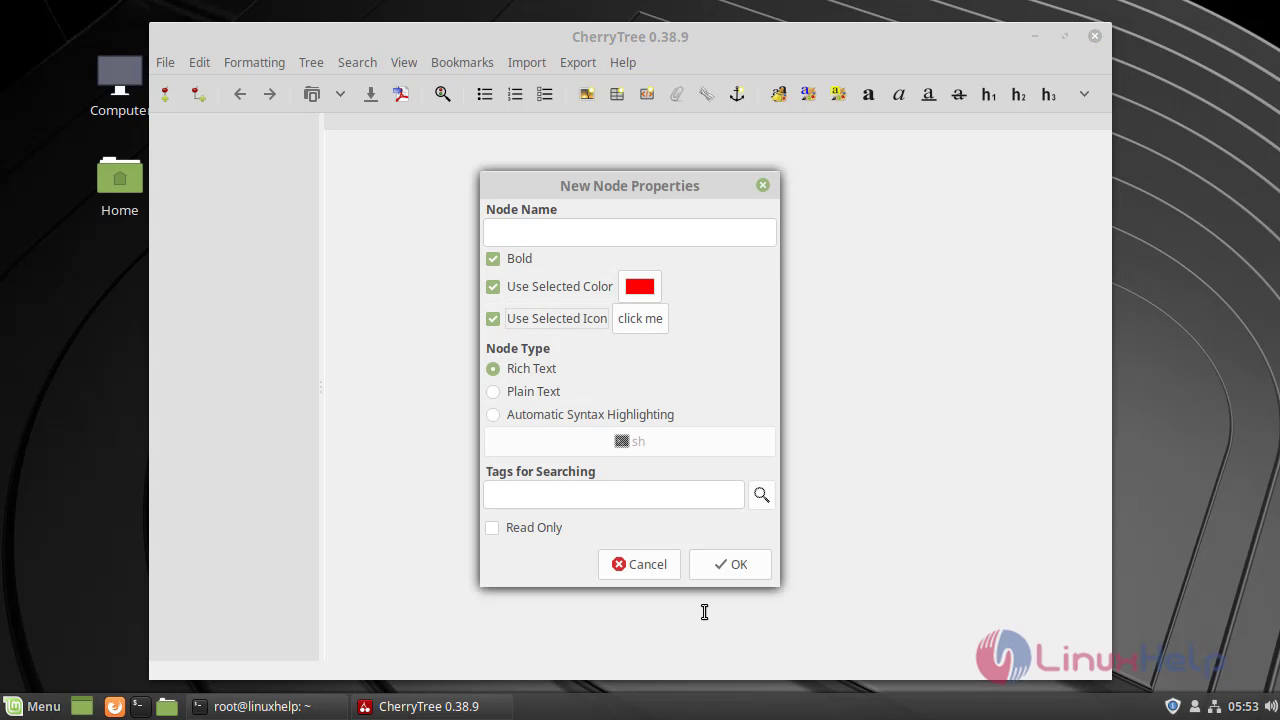
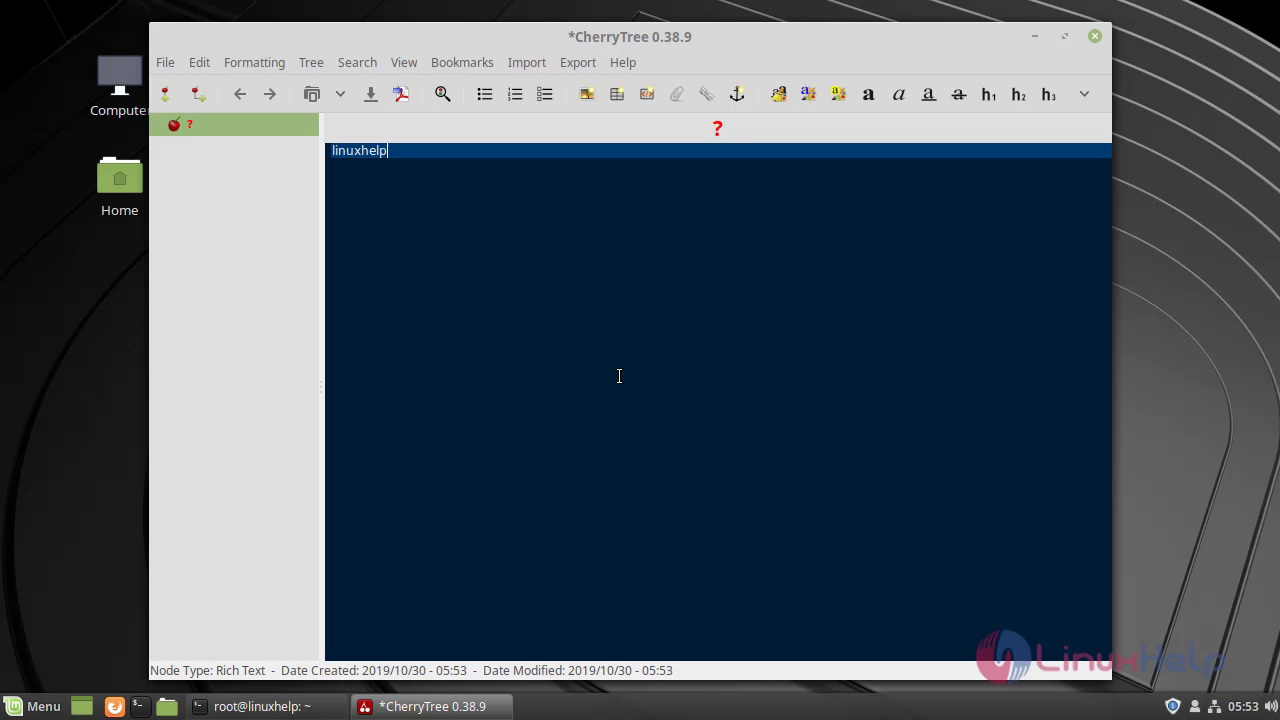
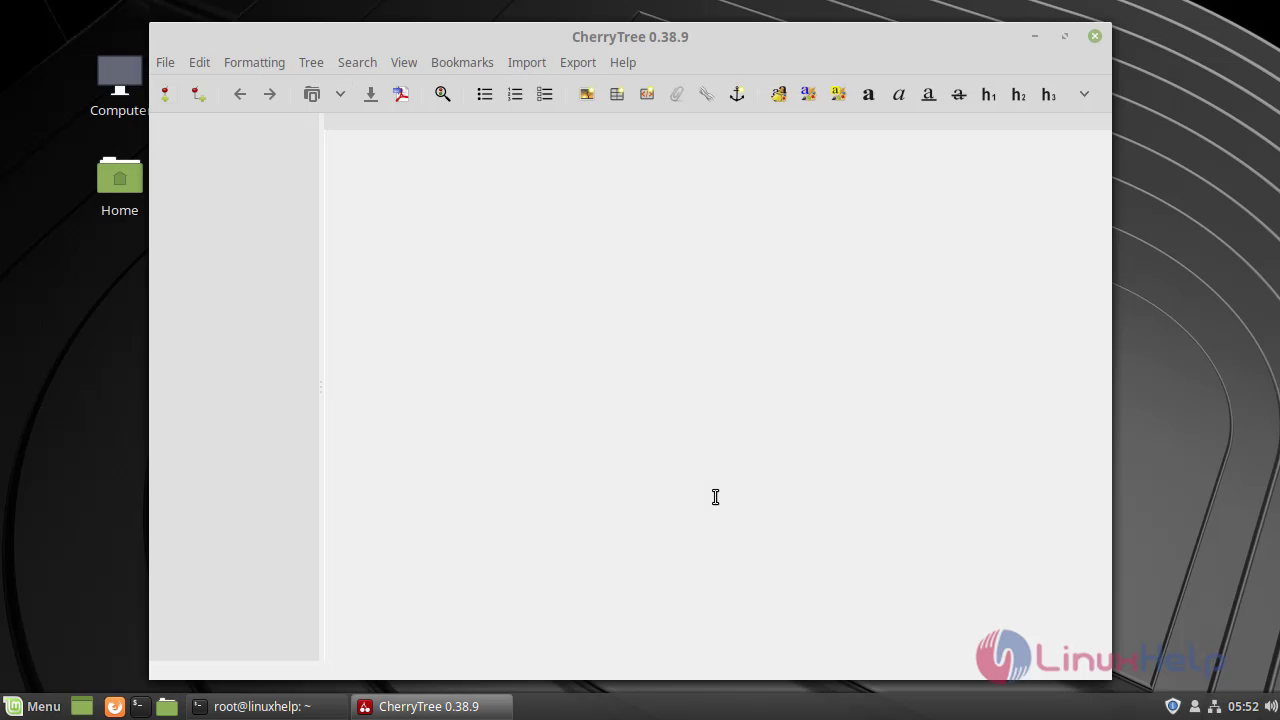
This is the CherryTree application snap1 Select the new project snap2 snap3 This is the method to install CherryTree on Linuxmint 19 and the tutorial ends here
Tags:
isaac
Author: 

Comments ( 0 )

No comments available

Add a comment
{{postCtrl.cmtErrMsg}}

Frequently asked questions ( 5 )

Q

My graphic tablet doesn’t work on Windows/Mac. Does CherryTree support advanced input devices such as Wacom?

A

Yes, GIMP does support graphic tablets and maps pressure, stroke speed and other events to its advanced brush engine properties. However, the version of the user interface toolkit that GIMP c

Q

Where to open the CherryTree text editor in ubuntu?

A

Once the package has been installed, type the CherryTree package name in the dashboard and run the application. The application is now used for various note-taking functions.

Q

Why do we need to install CherryTree text editor in Debian?

A

The CherryTree is a hierarchical text editor note-taking application that contains rich text, syntax highlighting, image handling, hyperlinks, import/export option and also support for multiple languages.

Q

Purpose of using the CherryTree?

A

Cherrytree is a lightweight text editor. It’s used for image handling, password protection, etc. It stores data as a single XML or SQLite file. It also provides a feature to copy/paste the hyperlinks from the other apps.

Q

The alternative for CherryTree?

A

Pixelmator, Paint.NET, Adobe Photoshop Lightroom, Pixlr Editor, and etc.

Back To Top!
Rank
User
Points

Top Contributers

userNamenaveelansari
135850

Top Contributers

userNameayanbhatti
92510

Top Contributers

userNamehamzaahmed
32150

Top Contributers

1
userNamelinuxhelp
31040

Top Contributers

userNamemuhammadali
24500
Can you help keel johnston ?
Unhide the folders on windows Explorer

Give any solutions to unhide folder using command prompt?

forum3

Networking
  • Routing
  • trunk
  • Netmask
  • Packet Capture
  • domain
  • HTTP Proxy
Server Setup
  • NFS
  • KVM
  • Memory
  • Sendmail
  • WebDAV
  • LXC
Shell Commands
  • Cloud commander
  • Command line archive tools
  • last command
  • Shell
  • terminal
  • Throttle
Desktop Application
  • Linux app
  • Pithos
  • Retrospect
  • Scribe
  • TortoiseHg
  • 4Images
Monitoring Tool
  • Monit
  • Apache Server Monitoring
  • EtherApe 
  • Arpwatch Tool
  • Auditd
  • Barman
Web Application
  • Nutch
  • Amazon VPC
  • FarmWarDeployer
  • Rukovoditel
  • Mirror site
  • Chef
Contact Us | Terms of Use| Privacy Policy| Disclaimer
© 2025 LinuxHelp.com All rights reserved. Linux™ is the registered trademark of Linus Torvalds. This site is not affiliated with linus torvalds in any way.